※Transparency Matters: This article contains promotional content and affiliate links. We only recommend products we’ve personally tested and believe will help your expat life in Japan.
Introduction: The “Streaming Struggle” in Japan
Moving to Japan is exciting, but setting up your home entertainment can be a headache. You walk into a Yodobashi Camera or browse Amazon.co.jp, only to see devices with Japanese menus and confusing specs.
Which one is truly easy to use in your preferred language? Which one lets you watch your favorite shows from back home while enjoying local Japanese apps like TVer?
In this guide, we compare the top 3 streaming devices in Japan to help you make the right choice!

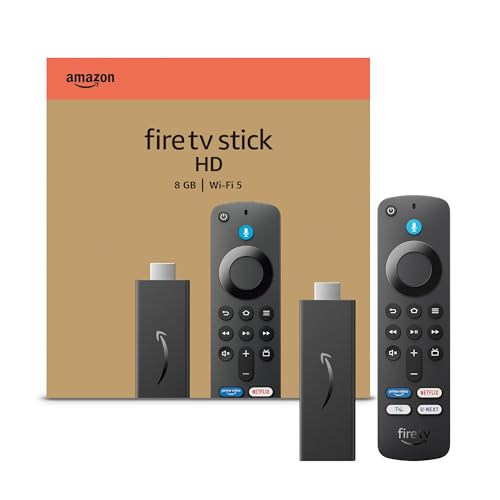
Amazon Fire TV Stick
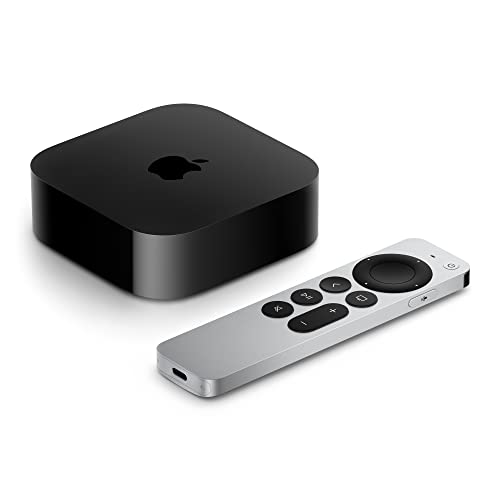
Apple TV
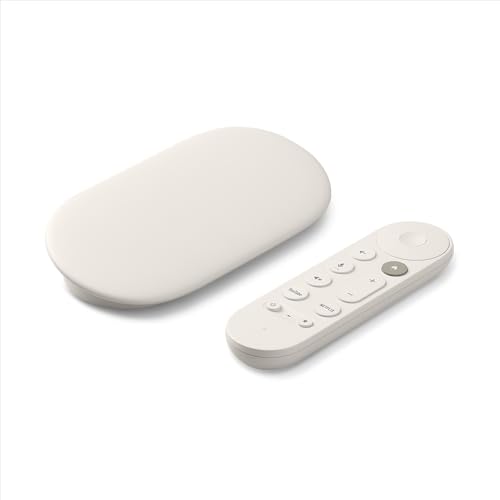
Google TV Streamer
1. Quick Comparison: Spec at a Glance
| Device | Best For… | Approx. Price Range | Language Options |
| Fire TV Stick 4K Max | Best All-Rounder | ¥9,000 – ¥13,000 | Full Multilingual |
| Apple TV 4K | Premium / Apple Users | ¥19,000+ | Native / Universal |
| Google TV Streamer | Android / Casting | ¥13,000+ | Full Multilingual |
Note: All the devices above allow you to switch the interface to English, Spanish, French, Chinese, and more during the initial setup, even if purchased in Japan.
2. Amazon Fire TV Stick 4K Max: The Budget King
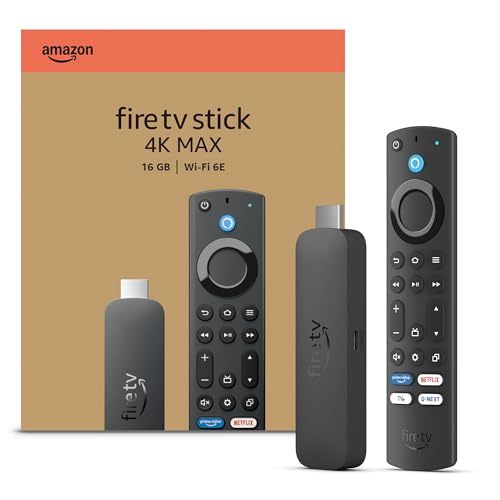
For many international residents, the Fire TV Stick 4K Max is the gold standard.
It’s affordable, powerful, and remarkably easy to switch to your preferred language.
Cost Efficiency (Massive Savings):
Amazon.co.jp frequently discounts this model during seasonal events. It remains the most affordable way to transform any Japanese TV into a high-speed, global entertainment hub.
Global Language Support:
Unlike some local TV software, it supports full multilingual menus (English, French, German, Spanish, Chinese, etc.) right out of the box. You can set up the entire system in your native language in seconds.
Premium Performance, Entry-level Price (High Speed):
The “4K Max” model features a high-performance processor that ensures a snappy, frustration-free interface. This speed is crucial when navigating between international streaming apps and Japanese local services, providing a high-end experience without the premium price tag of a dedicated console.
⭐️ View Fire TV Stick 4K Max on Amazon.co.jp (Best Value)
Pro Tip for Expats: The links above will take you to the Official Japanese pages. You can easily switch the language to English, Chinese, or other languages using the menu (usually a globe icon) at the top or bottom of the site.
3. Apple TV 4K: The Premium Powerhouse
If you already use an iPhone, Mac, or iPad, the Apple TV 4K is in a league of its own.

Why it’s great for expats:
It has the cleanest, most premium UI with zero ads. Setting it up is a breeze—just hold your iPhone near the device, and it syncs your Wi-Fi and Apple ID automatically.
The “Apple Ecosystem” Advantage:
You can use your iPhone as a keyboard (no more struggling to type Japanese addresses with a remote!) and connect your AirPods for silent late-night watching.
The Downside:
It’s the most expensive option, usually double the price of a Fire Stick.
⭐️ Check Apple TV 4K Prices on Amazon.co.jp (Premium Choice)
🌐 You’ll be redirected to the Japanese site. Change language from the menu if needed.
4. Google TV Streamer: The “Casting” Master
Google recently refreshed its lineup with the Google TV Streamer (4K), replacing the old Chromecast dongles.
Why it’s great for expats:
If you prefer searching for videos on your phone and “casting” them to the TV, this is for you. It also integrates perfectly with Google Home and Assistant.
Flexible Accounts:
It’s arguably the easiest device for switching between your Japanese Google account (for local apps) and your home country account.
The Downside:
The new design is a “set-top box” rather than a “stick,” so it takes up a bit more space on your TV stand.
⭐️ Check Google TV Streamer on Amazon.co.jp
🌐 You’ll be redirected to the Japanese site. Change language from the menu if needed.
5. The Verdict: Which one should you buy?
🏆 Choose Fire TV Stick 4K Max if…
You want the best balance of performance and price. It handles both Japanese services (TVer, U-NEXT, etc.) and global platforms (Netflix, Disney+, etc.) perfectly—all while allowing you to navigate the entire interface in your native language.
🏆 Choose Apple TV 4K if…
You are an Apple user and want the absolute fastest, smoothest, and ad-free experience. It’s worth the extra yen if you value quality.
🏆 Choose Google TV Streamer if…
You are an Android fan or rely heavily on YouTube and casting content from your smartphone.
6. Final Recommendation: Which Logic Applies to You?
To make your final decision, identify which profile matches your situation:
The Practical Budgeter
The Apple Power-User
The Content Hunter
The Practical Budgeter:
If you want a 4K experience for the lowest possible price and plan to use Amazon Prime, the Fire TV Stick 4K Max is the only logical choice.
The Apple Power-User:
If you own an iPhone and value a clean, fast, ad-free interface, the Apple TV 4K is the best long-term investment.
The Content Hunter:
If you use many different streaming services and want a smart AI to help you find what to watch, go with Google TV Streamer.
🌐 You’ll be redirected to the Japanese site. Change language from the menu if needed.
Looking for deeper comparisons?
We’ve published many in-depth comparison articles (originally written for Japanese readers). You can easily read them in English or other languages using your browser’s translation feature.
One Last Tip: Don’t forget the VPN!
Regardless of which device you choose, you will hit “Geo-blocks” when trying to watch content from your home country. To unlock the full potential of your new device, you’ll need a reliable VPN.

For a Broader Overview of Streaming in Japan
This article is part of our complete guide to streaming in Japan.
For a broader overview of devices, VPNs, and Amazon Prime Japan, see our Ultimate Guide to Streaming in Japan.