※Transparency Matters: This article contains promotional content and affiliate links. We only recommend products we’ve personally tested and believe will help your expat life in Japan.
If you’ve just moved to Japan, you’ve likely realized that local broadcast TV is difficult to navigate without high-level Japanese skills.
The best solution for your home entertainment is the Amazon Fire TV Stick!
However, many expats struggle with ;
- regional locks,
- language barriers,
- and account confusion.
This guide will show you ;

how to set up your Fire TV Stick in a language you’re comfortable with and access content from your home country and beyond while living in Japan!
Why You Should Buy a Japanese Fire TV Stick
You might be tempted to bring your existing device from abroad or order one from your home region’s Amazon store.
However, buying the Japanese model from Amazon.co.jp is highly recommended for three main reasons:
- Local App Compatibility:
- Hardware & Voltage:
- Next-Day Delivery:
1. Local App Compatibility:
Access Japanese streaming services like TVer (free local TV), Abema, and U-NEXT, which are often geo-blocked on overseas devices.

2. Hardware & Voltage:
The Japanese model is optimized for local 100V outlets🔌 and Wi-Fi frequencies (W52/W53/W56)🛜. Overseas models often suffer from unstable Wi-Fi connections in Japan.
3. Next-Day Delivery:
Amazon.co.jp offers incredibly fast shipping, often arriving at your door the very next day!
The “Account Trap”: amazon.com vs. amazon.co.jp
The most common issue for expats is the conflict between their home country account (Amazon.com, .uk, .sg, .in, etc.) and their Japanese account (.co.jp).
These are completely separate ecosystems!

| Feature | Amazon.com (Global) | Amazon.co.jp (Japan) |
| Membership | Prime doesn’t carry over to Japan. | Free JP account works (Prime is optional) |
| App Store | Global apps only. | Local JP apps (TVer, etc.) included. |
| Prime Video | Overseas library (mostly blocked). | Japanese library (huge selection). |
| Payments | Charges in USD/Foreign currency. | Charges in JPY / Accepts JP Gift Cards. |
- Important: You do not need to pay for a Prime membership just to use a Fire TV Stick. A free Amazon.co.jp account is enough to download free apps like YouTube, TVer (Japanese TV), and Abema.
- However, we highly recommend the [Japanese Prime membership] because it’s incredibly affordable (approx. $4/month) and unlocks a massive library of movies and free shipping, which is a life-saver for expats.
Pro Tip: The “Same Email” Login Issue
If you use the same email address for multiple Amazon stores (for example, Amazon Japan and another overseas Amazon store),
Fire TV may automatically sign you into the wrong store.

- The Fix: The Fix:Use a different password for each Amazon store account, even if they share the same email address. This helps Fire TV clearly distinguish between the Japanese store and other regions.
Step-by-Step: Setting Up the English Interface
Even if your device arrives in a Japanese box, you can use it entirely in your preferred language.
- Language Selection:
- Wi-Fi Connection:
- Login:
1. Language Selection:
This is one of the first screens you will see. You can choose English (US, UK, Australia, etc.) or other major global languages. Once selected, all menus will switch to your chosen language.
2. Wi-Fi Connection:
Connect to your home network. (Choose the 5GHz band for the smoothest 4K streaming).
3. Login:
Enter your Amazon.co.jp credentials (The Japanese account you created).
- Note: While menus support many languages, Alexa voice commands on Japanese devices are primarily optimized for Japanese and English. Choosing English will allow you to control your Fire TV and search for content using English voice commands.
Choosing the Best Model for Your Setup
| Model | Resolution | Best For… |
| Fire TV Stick HD | 1080p | Budget-friendly setups or smaller bedroom TVs. |
| Fire TV Stick 4K | 4K Ultra HD | Most users who want high-quality streaming. |
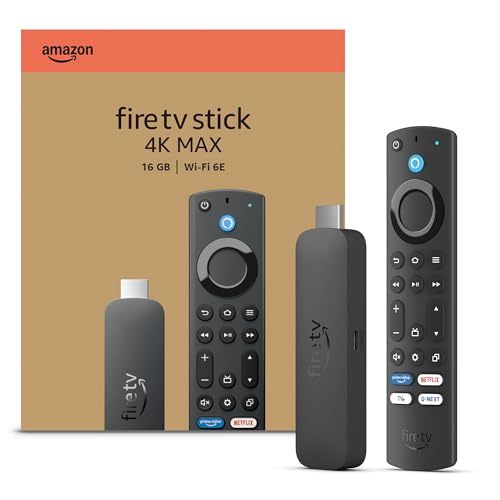
| Fire TV Stick 4K Max | 4K Ultra HD | Best Performance. Fastest processor and Wi-Fi 6E. |
Our Recommendation: Go with the Fire TV Stick 4K Max.
The faster processor makes a noticeable difference when navigating menus and switching between apps like Netflix and YouTube without lag!

Pro Tip for Expats: The links above will take you to the Official Japanese pages. You can easily switch the language to English, Chinese, or other languages using the menu (usually a globe icon) at the top or bottom of the site.
Troubleshooting: “App Not Available in Your Region”
If your menus are in English but you can’t download certain apps, you need to update your Country/Region settings:
- Log into Amazon.co.jp on your computer or smartphone.
- Go to “Accounts & Lists” > “Manage Your Content and Devices.”
- Click the “Preferences” tab > “Country/Region Settings.”
- Enter your Japanese address and click “Update.”
- Restart your Fire Stick, and the Japanese App Store will be fully unlocked.
No Japanese Credit Card? No Problem!
Don’t have a Japanese bank account or credit card yet?
You can still enjoy the Fire TV Stick:
- Amazon Gift Cards:
- Konbini Payment:
1. Amazon Gift Cards:
Available at any 7-Eleven, Lawson, or FamilyMart. You can use these to buy the device itself and pay for your Prime subscription.
2. Konbini Payment:
When ordering your Fire Stick on Amazon.co.jp, select “Convenience Store Payment” to pay in cash at the counter.
Summary: Your Gateway to Entertainment in Japan
Fire TV Stick helps connect your daily life in Japan with the shows and services you’re already familiar with. Using a Japanese Fire TV Stick and an Amazon Japan account makes everything work more smoothly.
Ready to upgrade your living room?
⭐️ Check the current price for the Fire TV Stick 4K Max on Amazon.co.jp here!
Fire TV Stick: Your Gateway to Free Shows on the Big Screen!
2026/09/25🚀 Latest Update! : Check out the top-selling Fire TV models right now!
Which model is right for you?
If you’re feeling overwhelmed, here’s a quick guide to help you decide:
1. For Standard TV Users
If you have a regular HD television, the budget-friendly “Fire TV Stick HD” is more than enough to elevate your viewing experience.
🔥 Our Most Popular Model!
2. For 4K TV Owners
If you own a 4K TV, treat yourself! For just about $10 (approx. 1,000 yen) more, the “Fire TV Stick 4K” delivers stunning, crystal-clear visuals that make every penny worth it.
✨ Official Retailer Link Below!
For a Broader Overview of Streaming in Japan
This article is part of our complete guide to streaming in Japan.
For a broader overview of devices, VPNs, and Amazon Prime Japan, see our Ultimate Guide to Streaming in Japan.